
Hyperstrike
-
Posts
8829 -
Joined
-
Quote:I, too, have lost badges. When the new zone exploration badges were introduced, I lost the last of each of the original zone badges and had to go get them again. I'm CERTAIN I lost them because as of Issue 13, I'd had ALL the exploration (save one Safeguard) and history badges available hero-side in-game.Originally Posted by graystar_blaster
 Not sure how or when it happend.
I recently decided to use the badgehunters tool on the website to track my badges. And as the site is newish i had to re enter my badges again(which is why i dont think i got around to it for so long)
So apon entering my badges i realized i lost 6 badges.
The hero mayhem misson badges are gone. And I think it happend when i switched sides.
So my question is this
1) has this happend to anyone else.
2) was i to get the villans ones when i switched sides
3) did it happen because i swithced sides. When i went back to heros they were not there
4) do they vanish when anyone switches sides
5) can i petition to get them back
6) or should i just run them again
I am 999,999,999 percent sure i got them already but now they are gone.
I am also haveing a hard time even finding a team to get them again (freedome)
ty for reading
I lost Isolator once.
Most recently I've found out that I lost all but TWO of my safeguard badges.
And this is on my main. Who has NEVER switched sides.
I've notified Paragon each time I've come across these losses. Unfortunately they either never respond or tell me I'm mistaken.
The last ticket I submitted was closed with nothing more than the automated response.
**ADDENDUM**
Actually, addressing this has got my dander up about the issue again.
Shot a PM off to Zwillinger asking him to put eyeballs on this thread and requesting a response other than "Maybe we'll look at this, maybe we won't" that comes with the automated responses. -
Also, on the flip side, there's the true whole-hog approach of gutting your machine and installing new insides.
Keep your current optical, and case.
New Power Supply
New Motherboard
New CPU
New Memory (did a combo deal that also netted you Acronis True Image)
New Video Card
New Hard Drive
If you're up to it, you're talking about $780 shipped. -
Quote:I'm sorry but you're incorrect.Originally Posted by newchemicals
That might be true if you are on the very low end of ram but not at 2GB.
Sorry, Mandu CPU does matter.
I've unfortuneately have seen more than my fair share of machines with 256MB RAM running XP.
Fine, when I get home I'll test zoning times. I know when I had my Athlon II 630 with 8GB of ram I would be the last one to zone in on lambdas. Now, with a Phenom II 965 same machine except with faster CPU I am in the first 1/3 of people zoning into Lambda.
In terms of loading, in his case, the memory is far more important. The reason is that currently he's SWAPPING TO DISK during loads. I don't give a damn if you have a 500Ghz CPU, if it's spending 99.9% of it's cycles waiting for data from mechanical storage it's no faster than his P4.
The CPU will help more in terms of FRAMERATE for some of the CPU-intensive portions of the game. But loading a zone map isn't one of them. Please feel free to continue arguing this if you like, but it won't change anything.
Comparing his 2GB system memory to your old configuration with 8 is meaningless because your system bottlenecks are in completely different places. -
Quote:Yes, but a 2500K would also require buying a new board and memory. I'm not sure he wants to COMPLETELY tear apart the system.Originally Posted by newchemicals
The ram would require tossing out the existing RAM and buying more DDR2 ram. $180 is a awful lot for an old E8400/E8500 cpu since you can buy a top notch 2500K chip at Microcenter for $180.
-
Quote:2.93Ghz E7500 Core2Duo: $120 (Free Shipping)Originally Posted by Wanted_NA
Well. More RAM and a new HDD where almost sure go for me (The HDD I have right now is too small and I need more storage space). I will have to check the market and see if they have any CPUs available that work for my motherboard. If can get a good deal on a Core 2 Quad processor might as well get that. My budget isn't exactly that tight. I have about $1000 saved aside for "personal luxury" ATM. But I honestly would rather not spend all that on a PC since there are a few more things I'd like to get as well.
4GB (2x2GB) Patriot DDR2 800 (PC6400) Memory: $60 (Free Shipping)
CoolerMaster 600W PSU: $63 shipped
Western Digital 1TB 7200rpm drive with 64MB Cache: $90 (Free Shipping)
Or if you don't mind open Box returns
Western Digital 2TB 7200rpm drive with 64MB Cache: $73 shipped
Also, don't worry if the drives say SATA 6GB. All these SATA drives are backwards compatible.
nVidia GTX 260: $108 Shipped
OR
nVidia GTX 460: $158 Shipped and a $30 Mail In Rebate
So, were you to go whole-hog on all these upgrades, you'd wind up spending $530-580 (and get a little back from the MIR).
Okay that's a bit... MUCH. I could see, with 3rd party software, defragging just the game file. But the whole drive? Believe it or not, that is simply adding disk wear and actually NEGATIVELY impacts disk performance.Quote:And I defrag my system every 2 weeks, plus after every patch for the game.
Your board might have need a BIOS update to recognize a 2TB drive, but you should be able to plunk a 1 to 1 1.5TB drive in no problem.Quote:I have an old IDE HDD right now, but the new one will definitely be SATA (probably going for a 500GB one rather than a 1TB. I don't think my MB will like the 1/2 TB HDDs). -
Quote:Question, do you leave the NCSoft launcher running? If so, set it to shut down when the game is launched.Originally Posted by _Spliffy_
CoH crashes on me when in Win7 (32bit) with 3gigs of ram (plus 1gig on the gpu). Basically there are no other apps running and CoH is running out of ram. It usually happens after 60 minutes+ of playing (almost like a memory leak).
I realize I should be on 64bit w/ 4gigs etc etc.... But:
I'm thinking it could handle this situation a little better... Does COH really need to crash itself? Is it just me having this problem? Are there any options I can pick to make it play nice?
Post your CoH Helper and Hijack This logs over in the technical support forum if this doesn't help your issue. -
Quote:Agreed. There's the Ascension armor than the Ascension Radiance. The stuff with the auras is the Radiance stuff.Originally Posted by Sumpfkraut
It'd be really awesome without the weird glowing stuff. That makes it look like out of WoW.-
Me either really.Quote:I really don't like the Ascension armour myself at all. -
Quote:On the contrary. Going from 2 to 3-4GB would probably make a difference in his zone loads. Purely because the system would be doing less disk swapping. My 4GB XP LAPTOP shows 3GB of RAM. Outside the game, it uses 2.2GB of RAM. The game uses another 1.something GB when in (so I shut down the SQL server I have running). I'm sitting right on the threshold of maxed out for a 32-bit OS.Originally Posted by newchemicals
Hyperstrike, more memory won't help much. The MB only has 2 Mem slots so more memory would require buying new DDR2 ram and throwing away the old ram. It won't make a P4 any faster

Agreed. One of the E7*** series would be most economical (2.9-3.0Ghz for between $120-150). Though if he doesn't object to spending more the E8400 or E8500 (3.0 or 3.1 Ghz for $180-200) would rip up quite nicely too due to the higher FSB being able to keep the chip supplied with numbers to crunch.Quote:Now A reinstall of XP would do wonders that I agree with. Based on what I see, since the MB will take a Core 2 processor, I would think that would be the first step.
Quote:Without knowing more specs on the machine it would be hard to say if the PSU would be up to the task of powering up the current Video cards on the Market. (also, would the video card fit in the case)
Probably not. But decently priced PSUs in that range are readily available. I probably wouldn't get anything much more powerful than a GTX260 though. And hell, Newegg has them for $100 new. The system won't be bleeding edge, but for $400-500 or so, he could give it a brand new lease on life and see NOTICEABLE performance gains. -
Quote:Typos on my part. I'd just speedily retyped it before going to work this morning and had a freudian fat-finger.Originally Posted by Mandu
Wow Hyperstrike. You somehow managed to travel forward in time from a distant past. Either that or you are cutting and pasting suggestions from some message board that is years old. 500 MB drive? 1GB or 2GB drive?


I'll correct it to 500GB and 1-2TB now. -
Well, played with the Incarnate Armor. But most of pieces are kinda ridiculously huge on Hyperstrike who's already ridiculously huge all by himself.
Still, did a slight mod of his main costume. Link to full-sized by clicking on this image.
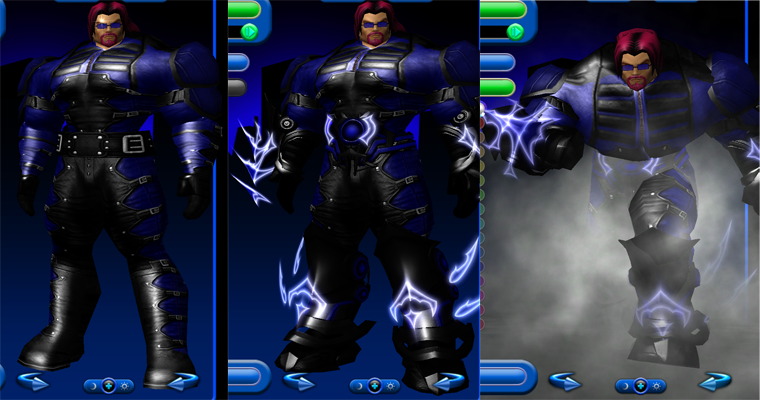
I'm actually impressed with the belt. Hyper is one wasp-waisted meat shield. And the belt fits him perfect.
And the path aura for clouds and lightning, it just looks COOL! Too bad it only looks this good when running in place. -
GAHHHHH! My damn browser backed out of the page on me! Okay, now I get to type all this crap out again!

First: I do NOT recommend an SSD for you. You're running XP and XP has no support for the TRIM garbage cleanup functions that most SSDs really require. Additionally, your system is too old and slow to warrant an upgrade to Win7.
Second: Get more RAM. It won't necessarily speed up your system a lot, but it'll help smooth out rough patches where you're currently swapping to disk.
Third: Clean out your system. Get a large external hard drive and move most of your crap off. Only copy it back to the system if you're IMMEDIATELY going to use the file.
Fourth: Are your drives IDE or SATA? If they're IDE you're not going to get a drive much larger than 500GB (which is a "why bother" for your situation). If your drives are SATA, I recommend getting 1TB 7200 rpm drives with 64MB caches. The drives will be a little overkill for a SATA1 system, but keeping the SATA1 "pipes" full of data isn't a Bad Thing. You COULD go to 2TB drives too, they're still relatively expensive (doubling disk space from TGB to 2GB MORE THAN doubles the price of the drive).
Fifth: CLEAN SYSTEM REINSTALL
With the assumption that you're going to use a 3rd party defrag product and system imaging (via Norton Ghost or Acronis True Image).
- Clean install from CD. (I recommend destroying and re-creating the old partion(s) as well during this phase.)
- Install AV and update AV.
- Scan system.
- Install system drivers.
- Install Windows Updates (basically everything save MS-offered drivers and language packs).
- Do most of your basic OS preference setups (no app installs!).
- Purge Windows Updates uninstall files *.
- Install Defragger.
- Set up a boot time defrag.
- Reboot and let the boot time defrag work.
- Defrag the drive normally.
- Use system imaging software (boot from the CD) to obtain a clean disk image.
- Click on Tools -> Folder Options
- Go to the View Tab
- Check "Show Hidden Files and Folders"
- UNcheck "Hide protected operating system files"
The reason I recommend disk imaging software is that, even if you never use the restore function, it is still available to you. Running the 12 steps above is pretty much an all day (or multiple day) thing. Restoring from a clean system image is a matter of a couple hours. Also, store the system image on a drive OTHER than the first drive. Preferably, you'd want to store it off-system completely.
Sixth: Install your game and application files to a drive OTHER than the operating system disk. This will cut down on disk I/O contention with the operating system. Also, during the clean reinstall DO NOT give in to the urge to partition off the OS and use the rest of the disk as a separate storage partition. Various apps, even when told to install to other locations, still deposit parts of themselves on the C drive (not to mention the stuff they register in the system registry). While 400GB is a BIT overkill for an OS partition, it insures that you're HIGHLY unlikely to run out of space.
Now, if you're swapping out for 1-2TB SATA drives, this advice is less compelling. In that case, I'd set up an OS partition of no more than 200GB and create the second partition as a temporary file dump. I would NOT use the second partition for app installs. -
Quote:2GB isn't a lot of RAM. The OS by itself can eat that. CoH by itself can eat up to 1.5 before destabilizing. Likely you have resource contention here forcing disk swapping.Originally Posted by Wanted_NA
Yeah. I have 2 GBs.
Once you're in this territory you're in trouble since swap space is several hundred times slower than main memory (and several thousand times slower than stuff in-flight on the CPU caches).
Things that can be used to reduce client-side zone load times:
1: More memory
2: Faster drives or drive systems. In this case (in order of preference low to high) 5400rpm HD < 7200rpm HD < 10,000 rpm HD < HD RAID 0 < SSD < SSD RAID 0.
Larger caches on your hard drives will help too, as they can spit out data faster than the mechanical portions of the drive can. And the larger the cache, the longer than can spit out data at this faster rate before falling back to the slower mechanical drive.
3: Don't play over wireless. Roughly 1/3 of wireless' bandwidth is eaten overhead (signaling, parity checking, retransmissions, etc). It's also higher latency than a strictly wired connection. As such your system waits longer between retransmissions for failed transactions.
4: Reduce the number of devices between you and your internet connection if possible.
Every device your data has to go through adds latency. Meaning it takes longer and longer for every packet to get where it's going. Now, granted, this is a matter of milliseconds, but several billion packets times X milliseconds is significant after a while.
IDEALLY, you should be hooked directly to your cable/DSL "modem". This would give you the best results. REALISTICALLY, if the "modem" doesn't also do firewalling or you have multiple devices you need to hook up, I'd recommend a router as well.
Also the reason I keep quoting "modem" is because the device used by cable/DSL providers isn't a modem. It neither modulates nor demodulates an analog signal. It's technically a "bridge" device (for connecting two disparate network types).
5: Clean system install. Your system, even with the apps to kill stuff, is quite cluttered, and there's always the possibility that you have underlying damage in the OS.
6: Defrag your hard drive. If you haven't defragged your hard drive in a while DO SO. Also, if you're using something like PerfectDisk, use it to specifically defrag any fragmented files in the CoH directory too. This can speed up load times because the hard drive can access every part of the file sequentially, rather than hunting all over the disk for pieces.
7: Make sure you stay above 15-20% free space. Windows requires a certain amount of free space on FAT and NTFS partitions so that it can properly manage the filesystems. Going below this point and you usually don't have enough contiguous free space left for the OS to do it's job.
8: Clean up your hard drive (but DON'T use compression!). In line with maintaining free space and defragging, if you have stuff on the system that you're not using, delete it or move it off to a backup drive. It's just cluttering up your system disk. But do NOT take the option to compress stuff to save space. Disk compression, while "nominally" seamless, adds massive latency to program operations as it has to unpack the files before it can read them and repack them before saving changes back to the disk. Now, heavily used files don't normally get compressed, but some of your ancillary config files might. Also, with all the packing and unpacking, you run a greater risk of data corruption with compression (instead of 2 operations (read/write) to handle a file, you now have four (unpack/read/repack/write). You've just doubled your chances of introducing a bit-level error at any of those stages.
9: (Not recommended but), also remember that your antivirus is doing scanning of all files on-access. This means it stops the app from reading the file while it makes sure it's "okay", then lets it go again. You could realize some speed gains by disabling your AV while gaming. However, this is HIGHLY not-recommended, plus the fact that some antivirus programs make the process of turning themselves off difficult at best, flat-out-impossible at worst. -
Quote:"Chartruse/Indigo Two-Tone Hulk not find funny!"Originally Posted by Memphis_Bill
Great. More of the rainbow of Hulks.
"Plaid hulk crochet!"
*WHAM!* -
Quote:Originally Posted by Silas
You get a couple support characters together and all the buffing/debuffing means that there's nothing which really qualifies as a "beating"

You know when Statesman gets low on health and starts dropping the huge AoE lightning bolts which will devastate squishies? Most teams the squishies have to back up out of the AoE.
Every support heavy RSF I've been on people have just stood right up there on the podium while Statesman rained ineffectual lightning down upon us.
And not a single **** was given that day.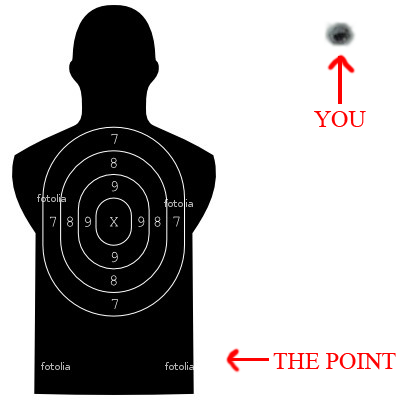
-
Quote:Originally Posted by Stone Daemon
See, it's things like this that stop Stone from showing up to RtR any more.

Colonel Sandurz: NO SIR! I DID NOT SEE YOU PLAYING WITH YOUR DOLLS AGAIN! -
Quote:Sure they do! But we're built tough! We can handle it! THEY usually can't take getting beat back though.Originally Posted by Ultraamann
Nothing beats a gathering of Tankers.
-
Quote:Two words (well, two more):Originally Posted by Paradox Fate
I somehow saw this kind of question somewhere else, too.
And to be honest, i think there will be no 'best solution' for such situations.
You beat off your nemesis, you are losing your family.
- Possible emotional breakdown/depression/turning into an Anti-Hero, going into a roaring rampage of revenge.
You rescue your family and letting your nemesis escape, with whatever he stole from there ... which can even be a important part of finalizing his WMD or <insert device which causes a high casulty rate>.
- You get shredded apart by the media if the nemesis -does- in fact, manages to fire off his weapon/device/whatever and dozens of civillians are either killed and/or injured along with the collateral damage which could cost billion of $'.
Of course, many would go towards the scond one, since because of the bias and the natural 'heroic' way heros deal with such things. If they see the bigger picture or not, i do not know.
But i am only theorizing here, since it's just a simple example without any bigger information behind it.
KOBAYASHI MARU! -
Quote:You don't get out much. Do ya?Originally Posted by HardRider
If you didnt like them why are u married and raising a kid?
Seems as if the majority of people nowadays who have kids do with people they only marginally know or like. Then, as they grate on one anothers' nerves for a few years. -
Quote:<Newb Hero> Natural?!?!?Originally Posted by Golden Girl
Save the family, then go after him - it's not really a difficult choice - especially with super speed
-
As noted, if you're solo'ing a lot, take those slots out of the teammate bubbles for now. They're of more use in your attacks and in Stamina and Health.
Young_Tutor's advice about stepping up to SOs and frankenslotting are -
Quote:Originally Posted by OutaControl
Still leaking... still locking up

Do you leave it up and running after launching the game?
If so, stop doing that. Regardless of how it presents itself, the NCSoft loader is NOT meant to just be left up and running for days at a time. -
Great showing yesterday. MUCH butt kicked.
-
Quote:HEIL WEBSTER!Originally Posted by Silas
mete*
-
Quote:Yes, but is the emote a headspin? A bunch of popping and locking? A backspin into a brace?Originally Posted by Golden Girl
How could you not have mentioned a breakdancing emote?
-
Quote:Yes but "Old Blood and Guts" wore his tucked into his cavalry boots. Look at your pic.Originally Posted by Power_Play
Indeed they were, but it doesn't wash. Multiple countries have used jodhpurs as part of their uniforms for a LONG time, including the USA...as evidenced by General Patton in his cavalry uniform with jodhpurs.

You can simulate that with the pants we have now.
The only thing you can't simulate is an exposed "tight pant leg" option.
