
Zombie Man
-
Posts
10412 -
Joined
-
Check out these threads:
Then post the results of these two programs:
- CoH Helper - it will show us basic computer settings and your CoH configuration.
- HijackThis - it will show us what's running on your computer concurrently with CoH. Click on "Do a system Scan and save a logfile." It will automatically open up Notepad and put the info there. Make sure Wordwrap is off in Notepad (Format > Wordwrap unchecked) before you cut and paste here.
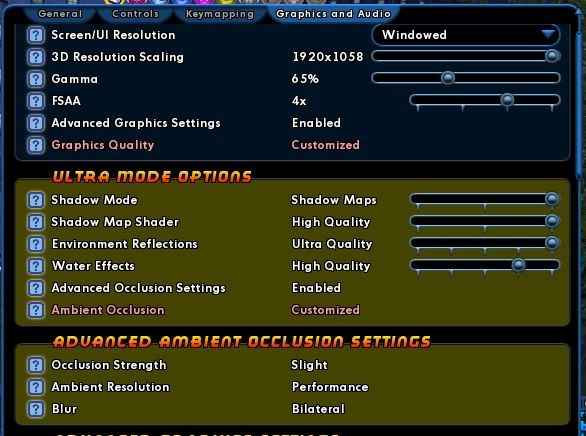
Also, go into the game and open Menu > Options > Graphics Tab and tell us what these settings are set at:
Ultra Mode Options (will appear only if Advanced Graphics is Enabled)
- Shadow Mode: Disabled, Stencil Maps, Shadow Maps
- Shadow Map Shader: N/A, Low, Medium, High Quality
- Environment Reflections: Disabled, Low, Medium, High, Ultra Quality
- Water Effects: Disabled, Low, Medium, High, Ultra Quality
- Advanced Occlusion Settings: Enabled or Disabled
- Ambient Occlusion: Off, High Performance, Performance, Balanced, Quality, High, Super, Ultra
And if Advanced Occlusion is Enabled...
- Occlusion Strength: Off, Slight, Medium, Strong, Strong with Color Bleeding
- Ambient Resolution: Off, High Performance, Performance, Quality, High, Super High
- Blur: No blur, Fast, Gaussian, Bilateral, Gaussian Depth, Bilateral Depth, Trilateral
-
Check out these threads:
Then post the results of these two programs:
- CoH Helper - it will show us basic computer settings and your CoH configuration.
- HijackThis - it will show us what's running on your computer concurrently with CoH. Click on "Do a system Scan and save a logfile." It will automatically open up Notepad and put the info there. Make sure Wordwrap is off in Notepad (Format > Wordwrap unchecked) before you cut and paste here.
Also, go into the game and open Menu > Options > Graphics Tab and tell us what these settings are set at:
Ultra Mode Options (will appear only if Advanced Graphics is Enabled)
- Shadow Mode: Disabled, Stencil Maps, Shadow Maps
- Shadow Map Shader: N/A, Low, Medium, High Quality
- Environment Reflections: Disabled, Low, Medium, High, Ultra Quality
- Water Effects: Disabled, Low, Medium, High, Ultra Quality
- Advanced Occlusion Settings: Enabled or Disabled
- Ambient Occlusion: Off, High Performance, Performance, Balanced, Quality, High, Super, Ultra
And if Advanced Occlusion is Enabled...
- Occlusion Strength: Off, Slight, Medium, Strong, Strong with Color Bleeding
- Ambient Resolution: Off, High Performance, Performance, Quality, High, Super High
- Blur: No blur, Fast, Gaussian, Bilateral, Gaussian Depth, Bilateral Depth, Trilateral
-
Check out these threads:
Then post the results of these two programs:
- CoH Helper - it will show us basic computer settings and your CoH configuration.
- HijackThis - it will show us what's running on your computer concurrently with CoH. Click on "Do a system Scan and save a logfile." It will automatically open up Notepad and put the info there. Make sure Wordwrap is off in Notepad (Format > Wordwrap unchecked) before you cut and paste here.
Also, go into the game and open Menu > Options > Graphics Tab and tell us what these settings are set at:
Ultra Mode Options (will appear only if Advanced Graphics is Enabled)
- Shadow Mode: Disabled, Stencil Maps, Shadow Maps
- Shadow Map Shader: N/A, Low, Medium, High Quality
- Environment Reflections: Disabled, Low, Medium, High, Ultra Quality
- Water Effects: Disabled, Low, Medium, High, Ultra Quality
- Advanced Occlusion Settings: Enabled or Disabled
- Ambient Occlusion: Off, High Performance, Performance, Balanced, Quality, High, Super, Ultra
And if Advanced Occlusion is Enabled...
- Occlusion Strength: Off, Slight, Medium, Strong, Strong with Color Bleeding
- Ambient Resolution: Off, High Performance, Performance, Quality, High, Super High
- Blur: No blur, Fast, Gaussian, Bilateral, Gaussian Depth, Bilateral Depth, Trilateral
-
Check out these threads:
Then post the results of these two programs:
- CoH Helper - it will show us basic computer settings and your CoH configuration.
- HijackThis - it will show us what's running on your computer concurrently with CoH. Click on "Do a system Scan and save a logfile." It will automatically open up Notepad and put the info there. Make sure Wordwrap is off in Notepad (Format > Wordwrap unchecked) before you cut and paste here.
Also, go into the game and open Menu > Options > Graphics Tab and tell us what these settings are set at:
Ultra Mode Options (will appear only if Advanced Graphics is Enabled)
- Shadow Mode: Disabled, Stencil Maps, Shadow Maps
- Shadow Map Shader: N/A, Low, Medium, High Quality
- Environment Reflections: Disabled, Low, Medium, High, Ultra Quality
- Water Effects: Disabled, Low, Medium, High, Ultra Quality
- Advanced Occlusion Settings: Enabled or Disabled
- Ambient Occlusion: Off, High Performance, Performance, Balanced, Quality, High, Super, Ultra
And if Advanced Occlusion is Enabled...
- Occlusion Strength: Off, Slight, Medium, Strong, Strong with Color Bleeding
- Ambient Resolution: Off, High Performance, Performance, Quality, High, Super High
- Blur: No blur, Fast, Gaussian, Bilateral, Gaussian Depth, Bilateral Depth, Trilateral
-
Check out these threads:
Then post the results of these two programs:
- CoH Helper - it will show us basic computer settings and your CoH configuration.
- HijackThis - it will show us what's running on your computer concurrently with CoH. Click on "Do a system Scan and save a logfile." It will automatically open up Notepad and put the info there. Make sure Wordwrap is off in Notepad (Format > Wordwrap unchecked) before you cut and paste here.
Also, go into the game and open Menu > Options > Graphics Tab and tell us what these settings are set at:
Ultra Mode Options (will appear only if Advanced Graphics is Enabled)
- Shadow Mode: Disabled, Stencil Maps, Shadow Maps
- Shadow Map Shader: N/A, Low, Medium, High Quality
- Environment Reflections: Disabled, Low, Medium, High, Ultra Quality
- Water Effects: Disabled, Low, Medium, High, Ultra Quality
- Advanced Occlusion Settings: Enabled or Disabled
- Ambient Occlusion: Off, High Performance, Performance, Balanced, Quality, High, Super, Ultra
And if Advanced Occlusion is Enabled...
- Occlusion Strength: Off, Slight, Medium, Strong, Strong with Color Bleeding
- Ambient Resolution: Off, High Performance, Performance, Quality, High, Super High
- Blur: No blur, Fast, Gaussian, Bilateral, Gaussian Depth, Bilateral Depth, Trilateral
-
Oops, This is an edited post since Father Xmas pointed out I got "Email down" mixed up with "Market down".

There is a known issue with the Email client. On Test, there is a patch to fix it. The patch note says:Global Email
So, could that be the source of your problem?
• Fixed a bug that would delete anything sent as an attachment if there was a double quote (“) in the body of the email.
Anyway, send a /petition in to get your inf back. -
Check out these threads:
Then post the results of these two programs:
- CoH Helper - it will show us basic computer settings and your CoH configuration.
- HijackThis - it will show us what's running on your computer concurrently with CoH. Click on "Do a system Scan and save a logfile." It will automatically open up Notepad and put the info there. Make sure Wordwrap is off in Notepad (Format > Wordwrap unchecked) before you cut and paste here.
Also, go into the game and open Menu > Options > Graphics Tab and tell us what these settings are set at:
Ultra Mode Options (will appear only if Advanced Graphics is Enabled)- Shadow Mode: Disabled, Stencil Maps, Shadow Maps
- Shadow Map Shader: N/A, Low, Medium, High Quality
- Environment Reflections: Disabled, Low, Medium, High, Ultra Quality
- Water Effects: Disabled, Low, Medium, High, Ultra Quality
- Advanced Occlusion Settings: Enabled or Disabled
- Ambient Occlusion: Off, High Performance, Performance, Balanced, Quality, High, Super, Ultra
- Occlusion Strength: Off, Slight, Medium, Strong, Strong with Color Bleeding
- Ambient Resolution: Off, High Performance, Performance, Quality, High, Super High
- Blur: No blur, Fast, Gaussian, Bilateral, Gaussian Depth, Bilateral Depth, Trilateral
-
Email yourself some temp power recipes and have your lowbie craft them. Then your lowbie will have a full attack chain.
-
Quote:Someone just posted in another thread that for them, MSE was the cause of huge delays until they went into MSE and put CoH on its exception list. Just FYI.Originally Posted by SkyRocker
 Microsoft Security Essentials
 -
If you're level 50, you shouldn't be using the Midnight Club to get to Cimerora unless you happen to be standing outside a university.
1. Go to Ouroboros or a Flashback Crystal in your base.
2. Chose the Daedalus or Airlia arc and teleport to contact.
3. Drop arc.
And who leaves Cimerora by way of the cave? Use the Ouroboros Portal, it's why God gave it to us! -
Test Server was just patched with a fix. Test the markets there. More that test it, the faster it can be pushed to Live.
-
And I just jumped onto a toon that didn't have Posi's Ally and did the flashback version and got Posi's Ally... so, proof!
-
Quote:From the unfinished badge info:Originally Posted by GATE-keeper
So for toons that don't already have the badge, they can get it by running the old TF thru Ouro? I thought that only the new TF awarded the badge for toons who don't already have it....
Quote:Complete both parts of the Revamped Positron's Task Force or complete the Classic Positron's Task Force to earn this badge. -
If you have a software firewall running, try disabling it to see if that's the cause.
-
This is *NOT* about the minimum requirements being raised.
This is about, shall we say, *lateral* changes to the engine, some of which are designed, in fact, to help lower end GPUs function better.
But with every change there is always the possibility that there was a bug on the end of the developers, or, an unforeseen conflict on some systems; not that the developers purposely increased the complexity of the game leaving some computer set-ups moribund.
So, we've seen so far that every time someone has reported an inability to play and people have run out shouting, "Ultra Mode has left low-end computers in the dust!", it has been shown that something else was the problem. Some of the things that have surfaced:
- Intel GPUs have faults in their drivers. Previously, CoH programmers kludged around those faults. The updates have revealed those faults again, but, it's the fault of Intel, not CoH.
- Background programs running: Most notably the ATI poller (External Events Utility) and the Google Toolbar.
- Firewall issues (other past CoH Issues have had Firewall issues exposed)
In other words, everyone that was playing the game before should be playing now. If that's not happening, it's a bug somewhere, not the raising of minimum requirements. -
Have you tried rebooting and seeing if the problem persists?
-
Quote:It will give your new level 1 characters a full attack chain. And with Beginner's Luck, they'll actually hit.Originally Posted by Jophiel
Don't forget that you can mail them now so your alts can collect them.
-
Quote:Don't be so cheeky.Originally Posted by rian_frostdrake
when they find that typo, i bet they will blush.
-
The old major arc limit may have been stealth-changed. Keep picking up new major arcs and see what the limit is.
For help seeing the difference between major or minor arcs, hover your cursor over the icons, or, see the link in my sig for a once-and-for-all fix. -
Quote:That was Electric/Boogaloo.Originally Posted by M_I_Abrahms
I have no idea what powers my Bots/Traps clone had, because all he did was run up to Ajax and dance.
-
Someone just said in VU that it was full before I7, now it's not.
-
Quote:Originally Posted by Zombie Man
It is part of the Missing Patch Notes.They were mentioned at some point in Beta. Sometimes, Castle would chime in and say, "we did this", which never got into the Patch Notes. Or players would post that "we found this" to the Patch Notes threads and they never got acknowledged.Quote:Originally Posted by Grey Pilgrim
Are those posted officially somewhere? If not, they need to be. I PM'd Ocho about that lack (as with the merits for explore accolades). Not sure if that's how Synapse found this or not, but I do hope that this gets posted officially somewhere.
Near the end of Open Beta, the number of unacknowledged changes which should have been in the Patch Notes was huge. To the credit of who ever is in charge of keeping track of such things, much of those missing patch notes did finally get included in the Live Release Notes.
However, to their discredit, some things mentioned over and over again (like the missing emotes) never did. And even though I posted a correction to the patch notes in two places (a separate thread to correct the version on the main web site, and another in the Patch Notes thread) -- they're still not corrected.
After Positron publicly admitted that the Patch Notes process had to be improved, it wound up that Lighthouse eventually took charge of Patch Notes and became very responsive in that regard... posting them ahead of time and correcting them immediately when mistakes were made or stuff left out.
Then when he left, the job seemed to have gone to Ghost Falcon, who did a so-so job. Then when he got promoted and Doc Delilah took his place, it seems no one is publicly stepping up to take responsibility for Patch Notes, not Doc, not the Mods, not War Witch. And it's not just the person saddled with the responsibility for publishing them -- it's very clear that the check-in process at the studio has collapsed since so many Devs are making very obvious and purposeful changes to the code and it never winds up on the Patch Notes. Not to mention those Devs who have always seemed immune to the Patch Notes check-in such as JLove and poshyb whose changes they make (especially bug fixes) almost never show up in the Notes. -
Quote:I'm sorry, let me rephrase...Originally Posted by Terror1
Did i say it was the buggiest?
Go ahead people continue to put words in my mouth.
Also Westley I'm glad i made you feel relevant
This is a particularly buggy release ever?
Buggier than the one with the rollback?
Buggier than CoV which was incompatible with a much higher number of people's computer set-ups?
Buggier than the invention system which is still being repaired to this day from bugs from launch (this very patch corrected the enhanceability of supposedly unenhanceable special IOs)?
Buggier than the one with the ITF which was unplayable by a significant proportion of the player-base?
I think not. -
Our Devs are notorious for feature creep.
It could be worse, they could be lethargic and give us very little. -
Next time you get the keys to where you want them to be, hit the save keybinds button in the Options Window. Then exit the game (through the countdown to server selection window). This will force a character save.
Then reboot and try again and see if the keybinds are correct even when you log in and zone.