
Zombie Man
-
Posts
10412 -
Joined
-
In the comic books, when Speedsters ran up walls, they never stopped. If they did, they would just fall.
This game needs to take into account players would would do stupid thinks like stop half way up a building. -
Art department's been kinda busy.
While it's a shame for people who can't take advantage of UM, the costumers did update 7 sets to take advantage of it for free.
While the new pistols were mainly for the Dual Pistols users which is a GR pay-for set, Thug MMs get to use them for free.
Art department also gave use some new, unique NPCs and unique TF maps in I17 for free.
The rest will cost you some for premium costuming. The Mutant pack will have new costumes. Demon Summoning gave us new art assets (their not costumes, but at least you can see where the art department's been spending their time).
And Going Rogue will have A LOT of new costumes. And who knows, maybe some of it will be made freely as part of I18. -
Quote:BTW, you can skip telling us what the Ultra Mode settings are. The latest version of CohHelper now includes them.Originally Posted by LaughingDan
 Oh almost forgot, they are running AMD and Intel 2600-3200+ type systems with AGP/PCI cards. I used to get CPU spikes when I had my old AMD 2600 all the time, but it never affected ventrilo at all. Something is gravely afoot.
Someone mentioned that it was a possible paging problem between CoX and windows. -
Ethereal Shifts are worth their weight in gold to stealth the LGTF, which you can't because of the drones, but with Ethereal Shift, it doesn't matter.
-
When you say you 'keep getting them', is that in multiple play sessions after a re-start of the client, or all in one play session?
-
Thanks to this updated CoHHelper, I was able to find out the settings for the various AO presets. See this post.
-
Thanks to Zloth updating his CoHHelper, I was able to see what the registry settings are for the various Ambient Occlusion settings when Advanced Occlusion Settings is set to Disabled (having AdvOS set to Disabled means you don't pick which settings are used, the slider for Ambient Occlusion does; if you want to mix and match various settings yourself, then you set AdvOS to enabled).
Ambient Occlusion: High performance
Occlusion Strength: Slight
Blur: Fast
Ambient Resolution: High performance
Ambient Occlusion: Performance
Occlusion Strength: Slight
Blur: Bilateral
Ambient Resolution: Performance
Ambient Occlusion: Balanced
Occlusion Strength: Medium
Blur: Bilateral
Ambient Resolution: Performance
Ambient Occlusion: Quality
Occlusion Strength: Medium
Blur: Trilateral
Ambient Resolution: Quality
Ambient Occlusion: High quality
Occlusion Strength: Strong
Blur: Trilateral
Ambient Resolution: Quality
Ambient Occlusion: High quality
Occlusion Strength: Strong
Blur: Trilateral
Ambient Resolution: Quality
Ambient Occlusion: Super high quality
Occlusion Strength: Strong
Blur: Trilateral
Ambient Resolution: High quality
Ambient Occlusion: Ultra
Occlusion Strength: Strong with color bleeding
Blur: Trilateral
Ambient Resolution: Quality -
Quote:Heh, I thought that Location:Texas would give that away.Originally Posted by Tex
GPU and I are not QA. We don't get paid to help out in the forums. Maybe that does make us rogue red-names..

I'm guessing that GPU and Tex are NCSoft assets located in Austin helping out in the NCSoft family for a bit until Ultra Mode is stabilized. Then they'll leave us... just like Bootsie when he got old an Mom and Dad took him to the farm in upstate New York so he can be happy to play with the other dogs.
Oh, god, please don't leave us, Tex, PLEASE!!! <sobs> -
Quote:Originally Posted by Samuel_Tow
Oh... Dang, and I got excited for nothing...
You just want to be mesmerized by Kelly Lebrock, because you know every Fortunata and Widow in the 80's looked like her.

-
And with AO enabled, no change. Hmmm...
But it's easy enough to diagnose without AO settings simply by telling folks to turn it off.
-
Thanks Zloth!
Here's mine with AO disabled:
---System information gathered by CoH Helper version 0.2.0.0---
DxDiag gathered at May 1, 2010 18:29 (-04:00)
Operating System: Windows 7 Home Premium 64-bit (6.1, Build 7600) (7600.win7_gdr.100226-1909)
System Manufacturer: System manufacturer
System Model: System Product Name
BIOS: BIOS Date: 11/11/09 17:22:03 Ver: 08.00.15
Central Processor: Intel(R) Core(TM) i7 CPU 920 @ 2.67GHz (8 CPUs), ~2.7GHz
Memory: 12288MB
.Net Memory Report: 10401MB out of 12279MB available
Page File: 22503MB (2052MB currently in use)
C Drive: (INTEL SSDSA2M160G2GC ATA Device) 86209MB out of 152524MB (56%) free
D Drive: (Hitachi HDS721010CLA332 ATA Device) 953620MB out of 953866MB (99%) free
E Drive: (ATAPI DVD A DH24AAS ATA Device) zero-size drive
Windows directory location: C:\Windows
DirectX: DirectX 11
DirectX Diag version: 6.01.7600.16385 (64-bit version)
Display Notes: No problems found.
Sound Notes: No problems found.
No problems found.
No problems found.
Input Notes: No problems found.
Monitor:
Monitor's Max Resolution: (blank)
Video Device Name: ATI Radeon HD 5900 Series
Manufacturer / Chip: ATI Technologies Inc. / ATI display adapter CrossFire Secondary (0x689C)
Video Memory: 3807 MB
Driver Version: 8.723.0.0
Driver Date: 4/6/2010 9:22:38 PM
Driver Language: English
Sound Device Description: Speakers (SoundMAX Integrated Digital HD Audio)
Driver File: ADIHdAud.sys
Driver Version: 6.10.0002.6585
Driver Date: 6/5/2009 5:42:04 AM
Sound Device Description: SPDIF Interface (SoundMAX Integrated Digital HD Audio)
Driver File: ADIHdAud.sys
Driver Version: 6.10.0002.6585
Driver Date: 6/5/2009 5:42:04 AM
Sound Device Description: Digital Output (SoundMAX Integrated Digital HD Audio)
Driver File: ADIHdAud.sys
Driver Version: 6.10.0002.6585
Driver Date: 6/5/2009 5:42:04 AM
WMI Information
Motherboard Manufacturer: ASUSTeK Computer INC.
Motherboard Model: (empty)
Motherboard Product: P6TD DELUXE
Motherboard Version: Rev 1.xx
BIOS Manufacturer: American Megatrends Inc.
BIOS Name: BIOS Date: 11/11/09 17:22:03 Ver: 08.00.15
BIOS Version: 111109 - 20091111
BIOS Release: 20091111000000.000000+000
Registry Information for Current User
Resolution: 1920x1058
3D Resolution: 1920x1058 (Not using renderscale)
Full Screen: No
Maximized: Yes
Screen Position: 0, 0
Refresh Rate: 60Hz
Vertical Sync Enabled: Yes
Physics Quality: Very High
Maximum Particles: 50000
Max Particle Fill? 10.000
Physics Card Enabled: No
Anti-aliasing: 4x
Anisotropic Filtering: 16x
Texture LOD Bias: Smooth
Water Effects: High quality
Bloom: 0.890 (turned off)
Depth of Field Enabled: No
Desaturation Effects (Sepia) Enabled: No
Shader Detail: High
World Texture Level: Very High
Character Texture Level: Very High
World Detail Level (Vis_Scale): 2.000
Entity Detail Level: 2.000
Shadows Enabled: Yes
Shadow Mode: Shadow maps
Shadow Map Shader: High quality
Environmental Reflections: Ultra quality
Gamma Correction: 0.646
Geometry Buffers (VBOs) Enabled: Yes
Suppression of FX When Camera Close Enabled: Yes
Close Suppression Range: 3.000
Show Advertisements: Yes
Audio Mode: Performance
3D Audio: Yes
FX Sound Volume: 0.530
Music Sound Volume: 0.240
Show Advanced Graphics Options: Yes
Overall Graphics Quality: 0.500
Reverse Mouse Buttons: No
Save Login Username: Yes
Transfer Rate: 1035681 bytes/second
Current Game Version: 1800.201003300904.10T4r
Installation Directory: C:\Program Files (x86)\City of Heroes
Mod files in the Data directory
. has 8 files
.\fonts has 1 file
.\texts\English\Menus has 4 files
.\texture_library\GUI\HUD\Contacts has 1 file
.\texture_library\GUI\Icons\Powers has 239 files
.\texture_library\MAPS\city has 1 file
.\texture_library\MAPS\Midnight_Squad has 1 file
.\texture_library\MAPS\Safeguard has 9 files
.\texture_library\MAPS\sewers has 44 files
.\texture_library\MAPS\Static has 34 files
.\texture_library\V_MAPS\Outdoor_Missions has 9 files
.\texture_library\V_MAPS\Static has 16 files
.\texture_library\WORLD\V_COV\Bases\Details\Functi onal\base_tele_arc_aux has 28 files
.\texture_library\WORLD\V_COV\Bases\Details\Functi onal\base_tele_aux has 28 files -
Quote:Did you ever sign up for scheduled tournaments in the arena interface?Originally Posted by Terror1
I keep getting Event does not exist on some toons and it loops. Some times the arena server decides to award me 0 inf.
What are these? -
It can be confusing because, on Test, everyone has access to those powersets. But on Live, need to pre-purchase GR because they are technically, part of GR.
-
Check out these threads:
Then post the results of these two programs:
- CoH Helper - it will show us basic computer settings and your CoH configuration.
- HijackThis - it will show us what's running on your computer concurrently with CoH. Click on "Do a system Scan and save a logfile." It will automatically open up Notepad and put the info there. Make sure Wordwrap is off in Notepad (Format > Wordwrap unchecked) before you cut and paste here.
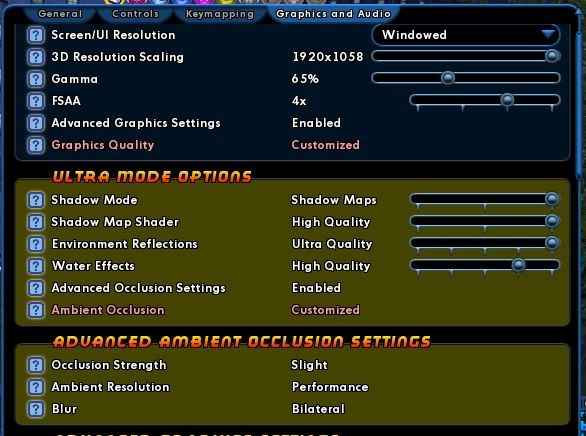
Also, go into the game and open Menu > Options > Graphics Tab and tell us what these settings are set at:
Ultra Mode Options (will appear only if Advanced Graphics is Enabled)
- Shadow Mode: Disabled, Stencil Maps, Shadow Maps
- Shadow Map Shader: N/A, Low, Medium, High Quality
- Environment Reflections: Disabled, Low, Medium, High, Ultra Quality
- Water Effects: Disabled, Low, Medium, High, Ultra Quality
- Advanced Occlusion Settings: Enabled or Disabled
- Ambient Occlusion: Off, High Performance, Performance, Balanced, Quality, High, Super, Ultra
And if Advanced Occlusion is Enabled...
- Occlusion Strength: Off, Slight, Medium, Strong, Strong with Color Bleeding
- Ambient Resolution: Off, High Performance, Performance, Quality, High, Super High
- Blur: No blur, Fast, Gaussian, Bilateral, Gaussian Depth, Bilateral Depth, Trilateral
-
I bugged that the first week of closed beta.
Since it's not game breaking... low on the priority list to be fixed. -
Looks like they did away with the limit. Which might explain why they don't try to make the minor arc icon look different than the major arc icon since unlimited major arcs makes the distinction moot.
-
There's supposed to be an Intel fix on the Test Server right now. You can hop over there to see if it works or wait till hits Live on Monday or Tuesday.
-
Quote:It was a joke.Originally Posted by Samuel_Tow
Huh? I don't remember seeing any fortunatas back then. Can you link to a pic?

-
Mail the temp recipes to the gold farmers that spam your email box.
-
Even before I17, there were lag spots. The problem with the infamous statue of Recluse is not the statue, but the animated screens all around the area. There are drawn and animated even when behind other geometry.
And that's one of the biggest problems for fps hits in the game, and was made even more problematic with dynamic shadows. If the computer is still drawing complex polygons that are out of sight and hidden by some other geometry, then it gets worse if it's drawing dynamic shadows that are out of sight.
All during Closed and Open Beta, we've been reporting those fps black holes, and many of them got fixed. E.g., the torches in the entrance-cave of Cimerora was a huge fps black hole -- there was something about those animations which killed fps. The odd thing was that you could go to the edge of the map, turn around and face where the cave is, and even though it was hidden by the geometry of the hills, you still took the huge fps hit. The game was drawing and animating that cave and its contents far away and out of sight.
That's been fixed.
Another big fps hit is looking down towards one of the under-zone rooms, such as the hospital or the inside of Paragon Town Hall. It seems the ground wasn't opaque enough, and was still tracking what was happening hundreds of yards under the zone.
There are other hot spots like that, especially looking into the heart of a city zone... all the buildings supposedly obscured are being rendered, and we know that CoV was built with very 'transparent' buildings. Dynamic shadows makes that more complicated.
The Devs are working on making that geometry more opaque, but it will take time.
The best way to keep dynamic shadow but avoid those fps hot spots is to make sure your world detail doesn't go about 100%. Only top end GPUs can handle 200% with dynamic shadows and keep fps over 40. I have a 5870, the top end for ATI, and when I put world detail up to 400% (/visscale 4.0), my fps goes down to 20 fps.
Which brings me to another point that bears repeating: There is no GPU out on the market right now that will allow anyone to turn everything up to max (including 400% world scale) and be at 60 fps. Just ain't happening.
Ultra Mode is enabled for the *next* generation of GPUs to max out. This current batch can't handle it (until SLI or Crossfire is fully enabled). Everyone has to chose which features to dial back for acceptable fps. -
David Nakayama plays. He's known in the comic book industry for his covers.
Oh, yeah, he's been on the CoH staff for 1 1/2 years and is now the lead art designer for CoH.
That's right, the lead artist for CoH is a well known supers comic artist.
Umm... Black Pebble... shouldn't you be advertising that?
-
It's typical for older computers, especially single-core computers to be running CoH at 100% CPU.
In another thread, someone posted they got ventrillo to stop sputtering by going into the Task Manager and setting the ventrillo program priority to 'high'.
In the meantime...
Check out these threads:
Then post the results of these two programs:
- CoH Helper - it will show us basic computer settings and your CoH configuration.
- HijackThis - it will show us what's running on your computer concurrently with CoH. Click on "Do a system Scan and save a logfile." It will automatically open up Notepad and put the info there. Make sure Wordwrap is off in Notepad (Format > Wordwrap unchecked) before you cut and paste here.
Also, go into the game and open Menu > Options > Graphics Tab and tell us what these settings are set at:
Ultra Mode Options (will appear only if Advanced Graphics is Enabled)
- Shadow Mode: Disabled, Stencil Maps, Shadow Maps
- Shadow Map Shader: N/A, Low, Medium, High Quality
- Environment Reflections: Disabled, Low, Medium, High, Ultra Quality
- Water Effects: Disabled, Low, Medium, High, Ultra Quality
- Advanced Occlusion Settings: Enabled or Disabled
- Ambient Occlusion: Off, High Performance, Performance, Balanced, Quality, High, Super, Ultra
And if Advanced Occlusion is Enabled...
- Occlusion Strength: Off, Slight, Medium, Strong, Strong with Color Bleeding
- Ambient Resolution: Off, High Performance, Performance, Quality, High, Super High
- Blur: No blur, Fast, Gaussian, Bilateral, Gaussian Depth, Bilateral Depth, Trilateral
-
Because of the markets being down, I DEMAND that the next issue come out in only two months from now!
-
How about them 80's Fortunatas and Widows with the big shoulder pads and swept-back teased out mullets?
Now you know why their helmets are so big. -
Check out these threads:
Then post the results of these two programs:
- CoH Helper - it will show us basic computer settings and your CoH configuration.
- HijackThis - it will show us what's running on your computer concurrently with CoH. Click on "Do a system Scan and save a logfile." It will automatically open up Notepad and put the info there. Make sure Wordwrap is off in Notepad (Format > Wordwrap unchecked) before you cut and paste here.